Follow these tips and techniques to avoid long-term storage fees and quickly sell through aged inventory.
Understand storage fees for aged inventory
Aged inventory is any inventory that has been stored at a Walmart Fulfillment Services (WFS) facility for longer than 365 days.
A long-term storage fee will be applied to inventory on the 366th day from the date it was received in the warehouse. You’ll see the long-term storage fee on your Storage report and your Settlement report. Both reports are on the Reports page in Seller Center, under Payments and fees.
Visit WFS Fees for fee-specific information and FAQs.
Identify your aged inventory
There are several ways to see your aged inventory throughout Seller Center: WFS Overview, the Inventory page and your Inventory health report.
From the WFS Overview page, your aged inventory will display in a tile.
Selecting Manage inventory above tile will take you to the Inventory page.
On the Inventory page you can identify your aged inventory at the top of the page or by selecting the Surplus and aged tab and reviewing the Aged units column.

From the Reports page you can also download the Inventory health report and refer to the columns titled ATS 366-450 days and ATS 450+ days. Items in these columns have been in a WFS facility and available to sell (ATS) for more than 365 days. Items in the column ATS 271–365 days are inventory close to incurring the long-term storage fee.
Optimize your listing
From your Inventory page, select the Surplus and aged tab. Select the Optimize button.
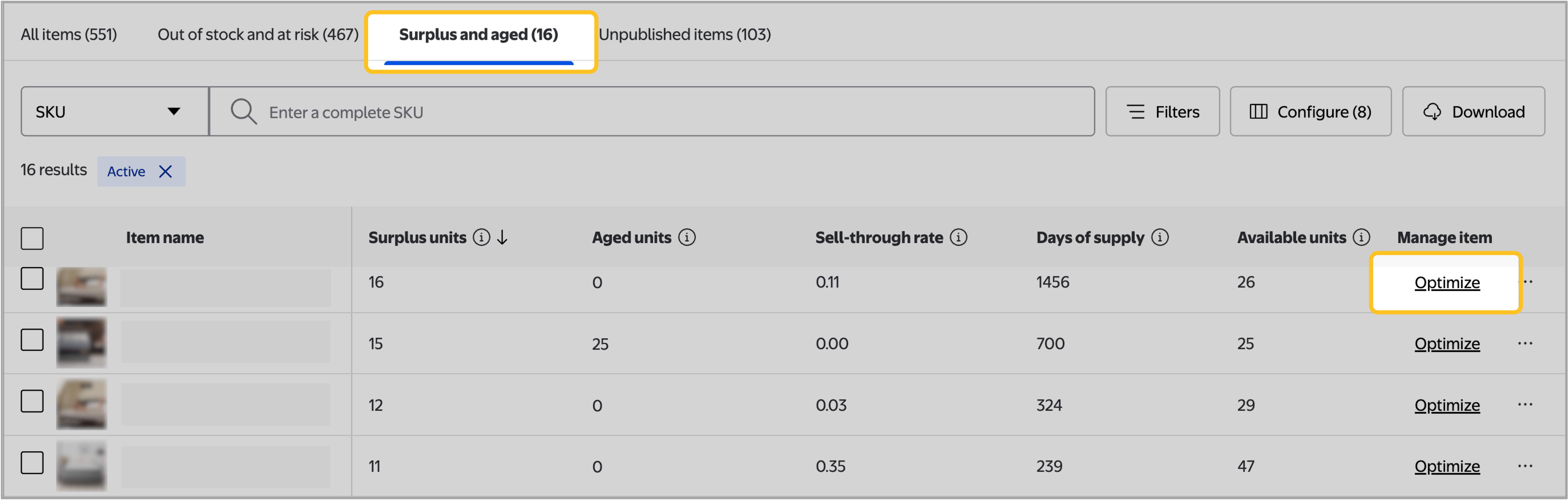
You’ll see a panel with some of these optimization options:
- Pricing update
- Listing quality
- Search Engine Marketing (SEM)
- Multichannel Solutions
Select each option to view opportunities to improve the offer.
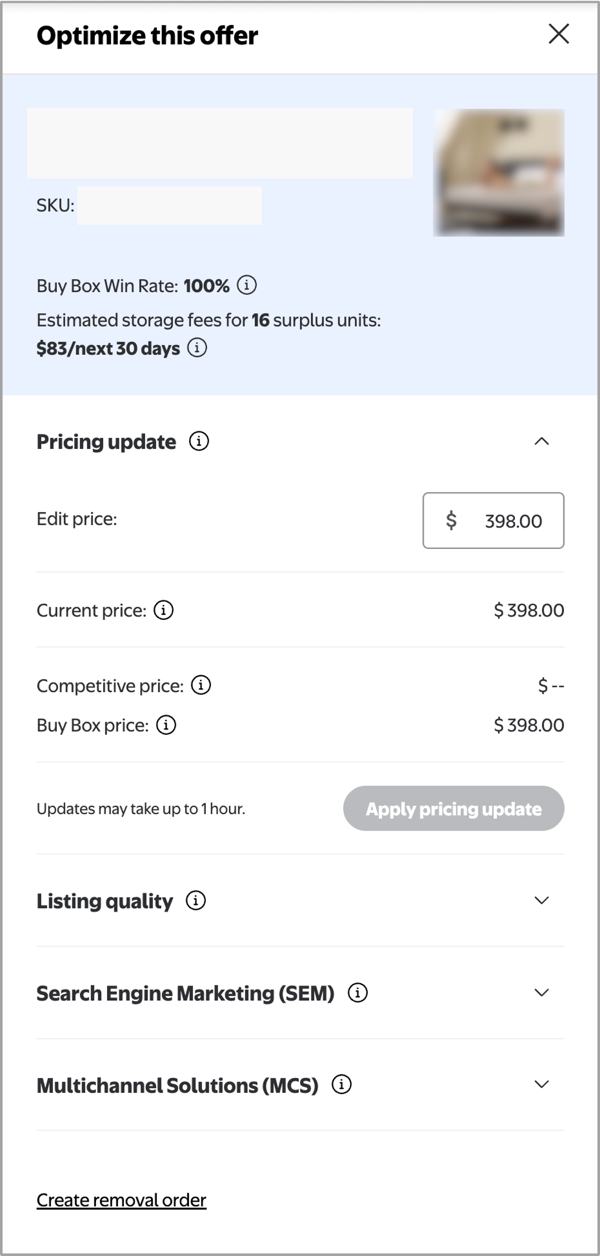
Pricing update
You can view the item's Walmart.com price, its price on other sites and the current Buy Box price. If the item isn't competitive, you can modify its price directly from this panel.
Listing quality
You'll see the item's listing quality score here. Listing quality includes elements of price, in-stock rates, reviews and content quality. If there's room for improvement, choose the Improve listing quality button to go to the Listing quality page and make updates.
Search Engine Marketing (SEM)
You can create Google Shopping Ad campaigns to promote your listing to customers searching on Google for items like yours. Campaigns that target your older inventory can help you sell through it faster.
Multichannel Solutions (MCS)
Did you know you can use Walmart Fulfillment Services to fulfill orders placed on other eCommerce channels? If you use WFS, you’re already qualified for Walmart’s Multichannel Solutions (MCS). MCS can help you sell through your inventory faster by pulling from your WFS inventory to fulfill orders from other channels. Here’s how it works.
Set up a sales channel in Seller Center for each eCommerce site your products are listed on. (Review our Add sales channels guide.)
- Add customer orders to your Multichannel Orders page as they come in. (Review our MCS Manage customer orders guide.)
There’s no additional item setup or transfers needed, and MCS doesn’t charge referral fees. Any MCS orders will be packaged in unbranded boxes and shipped with the fulfillment speed you select.
Additional marketing tools
Review syndication
Consider getting reviews for your items if they don’t have any yet. Try review syndication if you have reviews from your own site that you’d like to import, or Walmart’s Review Accelerator program to offer customers a digital reward when they review your items.
Sponsored search
Walmart offers a wide variety of advertising solutions to support your business growth, and one of the most effective for moving specific products quickly is Sponsored Search. This type of ad places your item high in results for relevant searches, and you only pay when your ad gets a click.
If your listing has great images, description and pricing, but doesn’t get enough views to make many sales, a Sponsored Search could be the push it needs.
Remove your inventory
If you’ve exhausted your other options, or you simply want to manage your fulfillment for aged inventory yourself, you can remove your inventory from WFS fulfillment centers. and choose to ship the inventory back to your warehouse, or dispose of it. Either option will incur a per-unit fee.
You can track the status of a removal order via the Removal orders page in Seller Center. Just select the 3 dots next to the removal order and choose Track removal order.