Inventory Transfer Service (ITS) moves your inventory to multiple fulfillment centers across the country. You send all your sortable* inventory to 1 building, called a transfer station, and we take care of distributing it nationwide for a fee. When you use ITS, you can:
Have inventory available across the nation
Improve your next-day and weekend delivery
Save on inbound shipping costs by sending 1 shipment for sortable items
Streamline prep and tracking by consolidating shipments
*Sortable items are less than 25 lb (11.3 kg) with maximum dimensions of 25" x 20" x 14" (63.5 cm x 58.4 cm x 35.5 cm) and volume less than 1.6 cubic feet. Calculate an item’s cubic feet (cu ft) using this method: Cu ft = Length (inches) × Width (inches) × Height (inches) ÷ 1,728.
Eligibility
Currently, ITS is available only to a select group of WFS sellers based on inventory type. If you’d like to get access to ITS, please contact your account manager or Support. 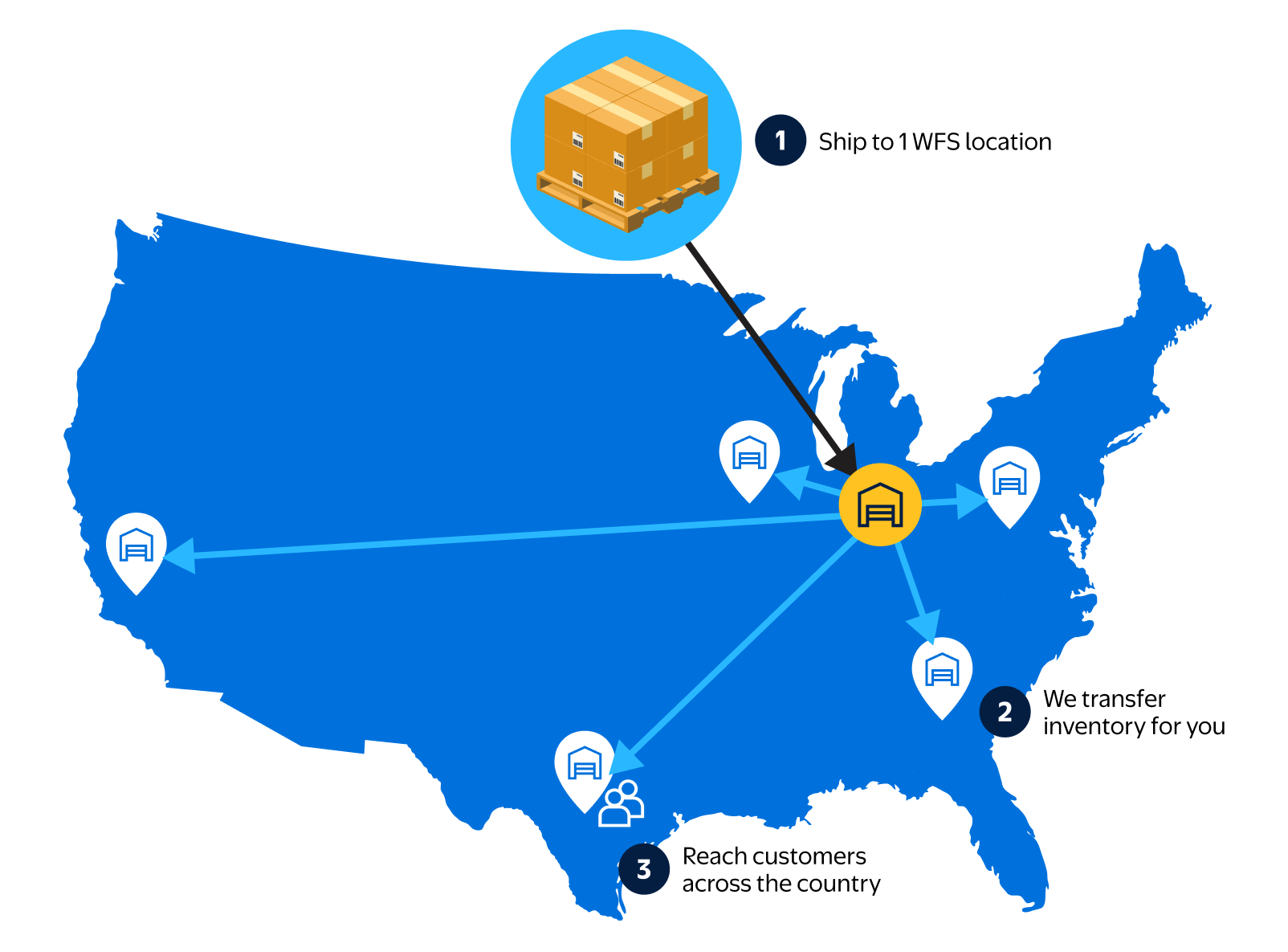
Fees
The following table breaks down the per-unit fees for ITS. When you create a shipping plan, you’ll also see the estimated total cost.
Here’s how to calculate shipping weight:
- For units that weigh less than 1 lb, use the unit weight. Then round up to the nearest pound.
- If your unit weight is equal to or over 1 lb, use the greater of unit weight or dimensional weight.* Then round up to the nearest pound.
*Dimensional weight = (length x width x height in inches) / 139
Shipping weight | ITS fee per unit |
|---|---|
1 lb or under | $0.25 |
1+ to 2 lb | $0.35 |
2+ lb | $0.35 + $0.10 for each lb> 2 lb |
Find more details about ITS fees for Walmart Cross Border: Imports in the section below.
How does it work?
When you create a shipping plan, you’ll see 2 options:
- If you use ITS, you’ll send inventory to a single transfer station.
- If you choose to distribute inventory yourself, you’ll send it to your assigned fulfillment centers. This may mean splitting your inventory and packing multiple shipments. Remember, you are required to ship your inventory to all fulfillment centers assigned to you. This lets us offer speedy delivery to shoppers across the U.S and improves your next-day and weekend delivery coverage.
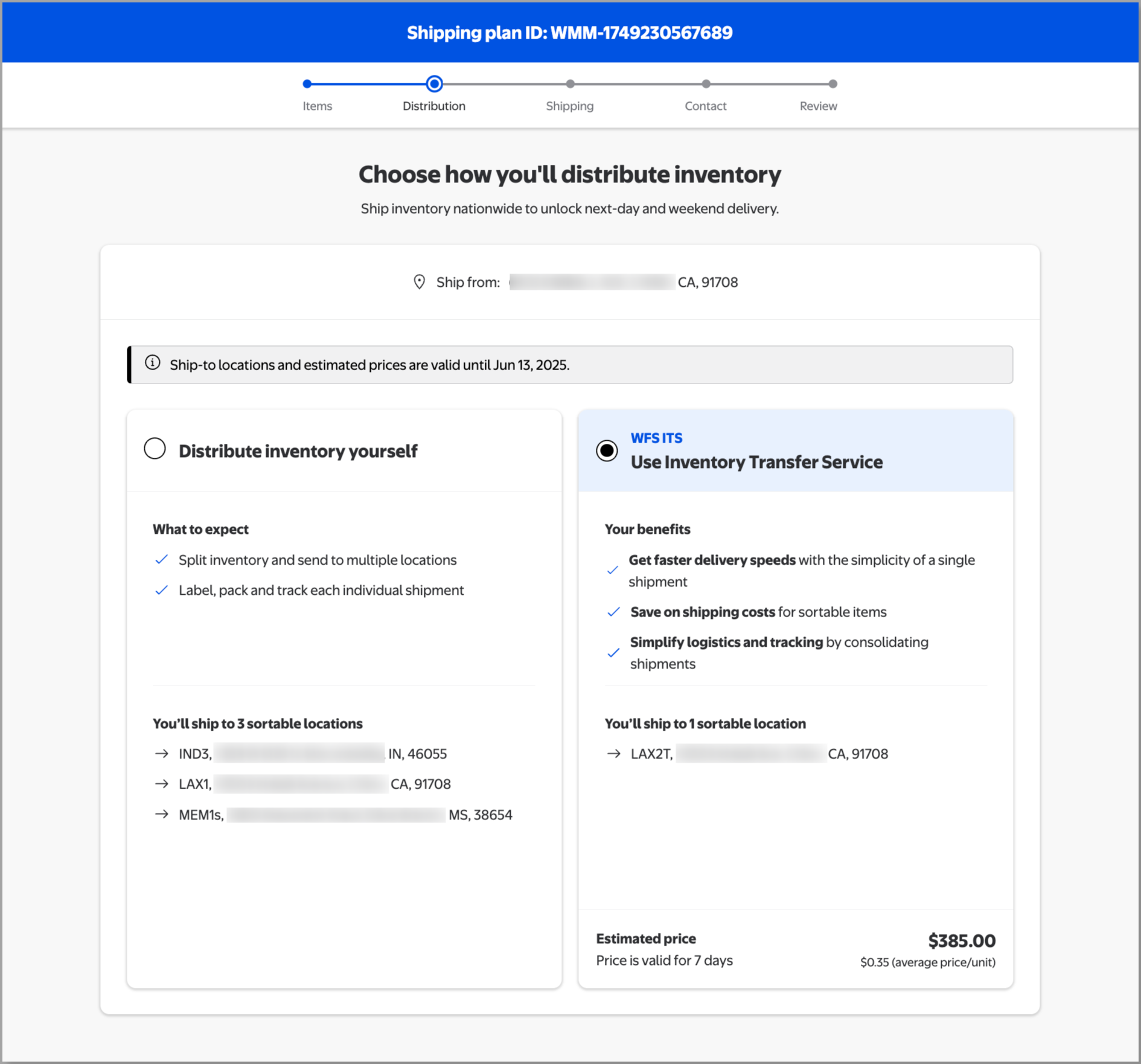
Some shipping plans may not have ITS because your items aren’t sortable or eligible.
When you choose ITS, you’ll be assigned a single transfer station to send inventory to. From there, we’ll split the inventory into multiple shipments and distribute it to fulfillment centers across the country. We choose the final destinations based on the item’s level on hand, on order and geography-based demand.
After arriving at the transfer station, some of your inventory may be available to sell within 4 business days. We'll also make sure enough inventory is distributed to the first fulfillment center, so your items stay in stock while we move the rest across the network.
Track inventory transfers
You can follow every unit from your dock to the transfer station and on to each fulfillment center. Here’s how to track the progress:
- Search for the shipment on the Shipping Plans page.
- Select Track to open a side panel with a summary of where your shipment is and how many units have been received.
- For more detail, select View shipping plan and then Track items.
In the Track items table, you can move through three tabs for each stage of the journey:
- The Shipment tab is the baseline and confirms what you sent. As inventory is received at the fulfillment center, you can track the fill rate for each item.
- Go to the Transfer station tab to see how units flow through the transfer station. You can compare which units were checked in against which were checked out and sent to a fulfillment center. If there are any problems, you'll see actions under the Issues column.
- Finally, the Fulfillment centers tab shows you where your checked-out units landed and whether they’ve been received. Expand each item for a breakdown by fulfillment center. This tells you exactly which location your inventory was routed to, how much has been received at each one and when the inventory was last touched.
.gif?branch=us_mplearn)
After arriving at the transfer station, some of your inventory may be available to sell within 4 business days. You can check the status of available inventory on the Inventory page.
Shipments made through Walmart Imports won’t have enhanced tracking for Inventory Transfer Service. In the Track items table, select the number in the Received units to open a pop-up with receiving progress at each destination.
ITS for Walmart Cross Border: Imports
From the time items arrive at a transfer station until they reach their final destinations, ITS works the same for both Walmart Cross Border: Imports and domestic shipments. During booking and transport before arriving at a Walmart facility, there are a few key differences for Walmart Imports shipments:
- Charge visibility during booking: During booking, an “Inventory transfer service” line item will show when you expand a shipping option that includes ITS. The same line will show on the final booking confirmation page.
Sortable: All Walmart Imports shipments of sortable inventory using any ocean transport mode (FCL and LCL), all origins and all destinations, will use ITS and you’ll see the ITS charge as part of your estimated price. Sortable dimensions are in the Overview of this guide.
Non-sortable: ITS will apply to non-sortable Walmart Imports shipments sent to a transfer station destination. Some non-sortable shipments may be booked directly to a fulfillment center, and thus would not use ITS. ITS is currently free for a limited time for non-sortable Walmart Imports shipments and the line item shows as fully discounted to $0.00 during booking.
ITS fee cap for Walmart Imports (as of August 11, 2026)
Limited ITS fees are just one of the benefits of using Walmart Imports to ship your inventory to WFS. ITS fees are calculated per unit based on weight using the ITS fee table, until your shipment reaches the Walmart Imports ITS fee cap.
In Seller Center, during booking you'll see a strikethrough on the ITS line price if your shipment reaches the Imports cap. The strikethrough number is what the ITS charge would be if the items in your booking were inbounded to WFS from a US domestic origin, and the line item price is the Walmart Imports ITS cap. The difference between the two is noted under the final price as “You’ll save $X with the Walmart Imports ITS cap (vs. standard weight-based ITS fees).”
Container/Shipment size | Walmart Cross Border: Imports ITS fee cap |
20’ Dry | $2,000 |
40’ Dry | $4,200 |
40’ High | $4,700 |
45’ High | $5,300 |
LCL shipments | $82/cbm |
View weight and volume limits for different container sizes and shipment modes.
After items have been received at their final fulfillment centers, you can see Imports ITS fees in the Settlement Report. Charges for each shipment are listed as “InventoryTransferFee” in the Transaction Type column. These are charged under different line items than Walmart Logistics charges.
ITS fee adjustment during and after booking
While booking Walmart Imports shipments, you’ll need to select Update price after adjusting your items to see your new ITS fees for each shipping option. After booking, ITS fees may change if booking information is inaccurate. For example, ITS fees will be added for any additional units received and will not be charged for any non-received units (e.g. any missing units at time of receiving). For LCL shipments, sometimes the cargo measurements at the origin warehouse (CFS) differ from what was provided at the time of booking. In those cases, adjusted ITS fees will be calculated into the new estimated price you accept at that time.
Manage receiving delays
Before you contact Support, follow these steps:
Track the status of each transfer, including the receiving progress. Associates inspect and put away each unit by hand, so it may take time to complete receiving.
Check the Shipping Plans page for receiving issues. Damage, incorrect prep and other issues may delay receiving.
If you use your own carrier, be as accurate as possible with the estimated ship date. This helps us plan labor and inventory capacity.
Also add the tracking number as soon as you get it. This helps us schedule deliveries more efficiently.
Wait at least 10 days from the time of delivery for receiving to finish.
If you believe your inventory is missing, you can open a dispute after 10 days.