Getting started
Item setup
Catalog management
Walmart Fulfillment Services (WFS)
Seller Fulfillment Services
Listing optimization
Order management
Taxes & payments
Policies & standards
Growth opportunities
Product listings
Pro Seller: Overview
Pro Seller: Pro Listing Savings
Assortment Growth: Overview
Walmart Business: Overview
Promotions
Price Incentives
Financing options
Voice of Seller
Advertising
Walmart Business
Advertising
Walmart Seller appNew


The Pro Listing Savings program is designed to help sellers who are in the process of earning or have earned Pro Seller status. The program is intended to help sellers grow, improve product visibility and earn up to a 10% Referral Fee discount on qualified Pro Listing offers. In this guide, you’ll learn how to improve your chances of qualifying your offers for Pro Listing Savings.
How does it work?
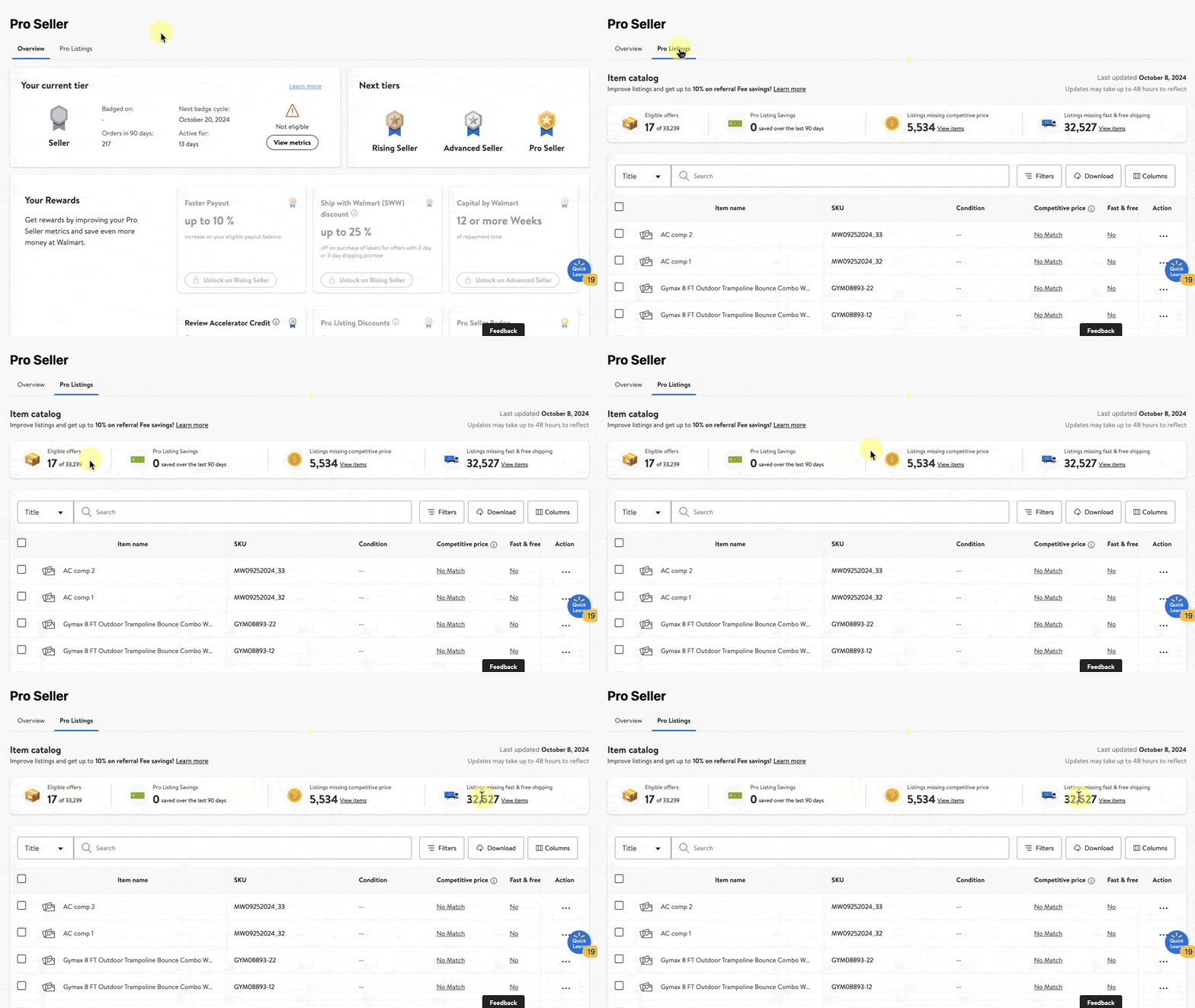
To view your eligible Pro Listing offers, navigate to the Pro Seller dashboard and select the Pro Listings tab. Your Pro Listing Savings from the last 90-days are displayed at the top of the list.
You can also view how many eligible offers are in your catalog and the number of listings without competitive pricing or fast & free shipping.
In order for items to be eligible for Pro Listing Savings, you must first have an active Advanced Seller or Pro Seller tier status. Next, your listings will need to meet the following offer requirements:
Your offer must have competitive pricing that meets or beats market
Your offer must have fast & free shipping in two days or less
Once these requirements are met, future orders on those Pro Listings will earn you a 5% discount on referral fees as an Advanced Seller or a 10% discount on referral fees as a Pro Seller.
Referral Fee discounts from other programs can’t be combined with the Pro Listing Savings discount. Seller offers may not receive a Pro Listing Savings discount if the Seller is already receiving a higher discount from another program. Walmart reserves sole discretion in deciding what Referral Fee discount to apply to Seller’s offer.
Additional guidelines
To help increase your chances of qualifying for Pro Listing Savings, follow best practices below.
Competitive price: Enable the Repricer and assign items to a Competitive price or External price strategy based on rules you set to help keep your prices competitive .
External price match: Submit an external price match to help customers gauge price competitiveness and define item eligibility in some Marketplace pricing programs. Offers that are missing price match will not be eligible to meet the competitive price requirement.
Fast & free shipping: Enroll in the expedited delivery program, simplify your shipping settings or fulfill orders with Walmart Fulfilment Services (WFS) to ensure quick and timely shipping to customers. Increase the number of shipping regions you offer fast and free shipping to cover more potential customers.
You must have the Amazon Standard Identification Number (ASIN) of a comparable item to submit an external price match. You can regularly verify ASIN information by generating an Item Report in Seller Center.